
Download Ideal Calorie Intake Calculator – Calorie Calculator, Weight Loss, Daily Calorie Needs, BMR Calculator
Overview
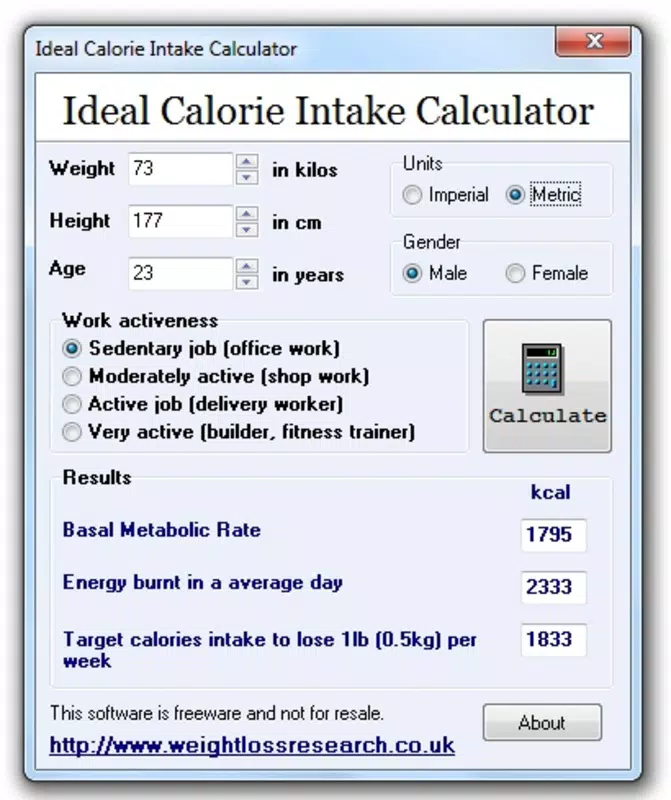
The Ideal Calorie Intake Calculator is a straightforward utility designed to help users estimate their daily caloric needs based on fundamental personal data. By analyzing weight, height, sex, and activity level, the app calculates the Basal Metabolic Rate (BMR) and provides insight into the number of calories required to maintain, gain, or lose weight. Its primary purpose is to support individuals aiming to manage their diet and fitness goals with data-driven decisions. The app is particularly useful for those seeking a simple, no-frills approach to understanding energy balance without relying on complex platforms.
Target users include people interested in weight management, healthy eating, and general wellness. Whether someone is looking to lose 0.5 kg per week or maintain their current weight, the app offers a basic framework for dietary planning. The tool is especially relevant for individuals who prefer manual input over continuous tracking or wearable integration.
Its long-standing presence since 2009 indicates consistent functionality and reliability, suggesting a stable core algorithm. The developer, Eddie C. Reardon, has maintained a focused approach, delivering a tool that prioritizes accuracy and accessibility over feature overload.
Real-world use cases include pre-workout meal planning, setting daily intake goals, and monitoring progress through self-reported data. In the broader app ecosystem, the Ideal Calorie Intake Calculator occupies a niche as a lightweight, no-ads, free solution for users who value simplicity and privacy. It serves as a foundational tool that can complement more advanced nutrition apps or be used independently for quick estimations.
Key Features & Functionality
- Caloric Needs Calculation: The app computes daily caloric needs using input data such as weight, height, sex, and activity level. This calculation is based on standard metabolic formulas, providing users with a personalized estimate of their total daily energy expenditure (TDEE).
- Weight Loss Guidance: It offers a specific calorie target designed to facilitate a safe and sustainable weight loss of 0.5 kg per week, which is aligned with health recommendations for gradual fat reduction.
- Metric and Imperial System Support: Users can enter height and weight using either the metric system (kilograms and centimeters) or the imperial system (pounds and inches), ensuring accessibility across different regions and user preferences.
- Basic Metabolic Rate (BMR) Estimation: The app calculates BMR, which represents the number of calories the body burns at rest, forming the foundation for all daily energy calculations.
- Instant Results: After entering personal details, the app delivers immediate feedback, enabling quick decision-making for meal planning or dietary adjustments.
For example, a 30-year-old woman who is 165 cm tall, weighs 68 kg, and has a moderate activity level can use the app to determine her BMR and daily caloric needs. The app then provides a target intake to achieve a weekly weight loss of 0.5 kg. This feature is especially helpful for users who want to avoid overeating or undereating without relying on external tools. The interface allows for easy data entry and clear output, making it suitable for both beginners and those with intermediate knowledge of nutrition.
Interface, UX & Performance
The Ideal Calorie Intake Calculator features a clean, minimalistic interface focused on functionality. Navigation is direct, with input fields for height, weight, sex, and activity level clearly labeled. The layout prioritizes readability and ease of use, minimizing distractions. Users can switch between metric and imperial units with a simple toggle, enhancing accessibility.
Interaction is intuitive, requiring only basic touch input. The app does not include complex animations or visual elements, which contributes to its lightweight nature and fast load times. Although the developer did not list formal performance metrics, the app’s small file size of 1.4 MB suggests optimized code and efficient resource usage. This makes it suitable for older Android devices with limited processing power or memory.
Responsiveness is consistent across various screen sizes, and the app maintains stability during typical usage. There are no reported issues with crashes or freezes based on available data. The lack of advertisements or in-app purchases further enhances the user experience by eliminating interruptions. The overall performance reflects a mature, well-maintained application that prioritizes speed and reliability over visual flair.
Platform Compatibility & Technical Requirements
The Ideal Calorie Intake Calculator is available exclusively on the Android platform. It requires an Android operating system, though specific version requirements were not listed by the developer. The app has a file size of 1.4 MB, making it suitable for devices with limited storage space.
Compatibility information was not fully disclosed. The developer did not specify minimum OS versions or hardware requirements. However, given the app’s age and lightweight design, it is likely compatible with a wide range of Android devices released since 2009. Users should ensure their device meets general Android system standards for app installation. The app is free to download and install, with no in-app purchases or subscription models.
Pros and Cons
Pros
- Simple, intuitive interface suitable for all skill levels.
- Supports both metric and imperial measurement systems.
- Provides accurate BMR and daily caloric needs estimation.
- Offers a realistic weight loss target based on health guidelines.
- Free to download and use with no ads or in-app purchases.
- Small file size ensures quick installation and low storage usage.
Cons
- Specific OS version requirements were not disclosed.
- No integration with fitness trackers or health apps.
- Limited to basic input data; no advanced nutritional analysis.
- Does not support multiple user profiles or data history.
- Outdated visual design may not appeal to modern users.
FAQ
Is Ideal Calorie Intake Calculator safe to download?
Yes, the app is free from malware and does not require excessive permissions. It is developed by Eddie C. Reardon and has been available since 2009 without reported security incidents.
Can I use this app on iOS devices?
No, the app is currently available only on Android. There is no official iOS version available at this time.
How accurate is the calorie calculation?
The app uses standard formulas to estimate BMR and daily caloric needs. While it provides a reliable baseline, individual results may vary based on body composition and metabolic differences.
Does the app require an internet connection?
No, the app functions offline. All calculations are performed locally on the device, ensuring privacy and uninterrupted use.
Is the app updated regularly?
While the developer has not provided update details, the app has remained available since 2009, suggesting ongoing maintenance and stability.
Final Thoughts
The Ideal Calorie Intake Calculator remains a reliable, no-nonsense tool for anyone seeking to understand their daily caloric needs. Its focus on simplicity, accuracy, and accessibility makes it a valuable asset for individuals managing their weight, planning meals, or improving their overall health. Despite its minimal design and lack of modern features, it delivers core functionality effectively and efficiently. For users who prefer a lightweight, free, and privacy-focused solution, this app stands out in the crowded health and fitness space.
Download Ideal Calorie Intake Calculator now


